.png)

.avif)
Imagine a customer visiting your online store and searching for “gifts under $18,” using Shopify search without knowing the exact keyword.
If they see irrelevant products or a “No results found” page, they leave, leading to a poor experience and lost sales.
Research from Opensend shows that around 30% of users rely on search, and they’re 2–3 times more likely to convert than those who just browse.
This means when your search fails, you are not only losing your traffic but also a high-intent customer who is about to make a purchase.
That’s exactly where apps like AskTimmy, with its AI-powered shopping assistance, will make a difference.
Instead of relying on basic search, your customers can now type in their natural language to find the products they need and get instant results.
For example, when your customer types “gifts under $18,” they get relevant suggestions within seconds, even if it doesn’t match the exact keyword.
That’s where AskTimmy turns search into sales by turning missed opportunities into conversions and more purchases.
To understand how this works, let’s explore how AI chatbots are transforming search experiences and driving sales.
Why Shopify Search Doesn’t Always Lead to Sales?
Customers who search are most likely to convert. But if they don’t find the right product, they will quit without making a purchase.
Shopify search is designed to match keywords, but customers don’t always search in keywords.
They usually type in phrases or describe what they’re looking for, e.g., “affordable birthday gifts under $18” or “something unique for a friend.”
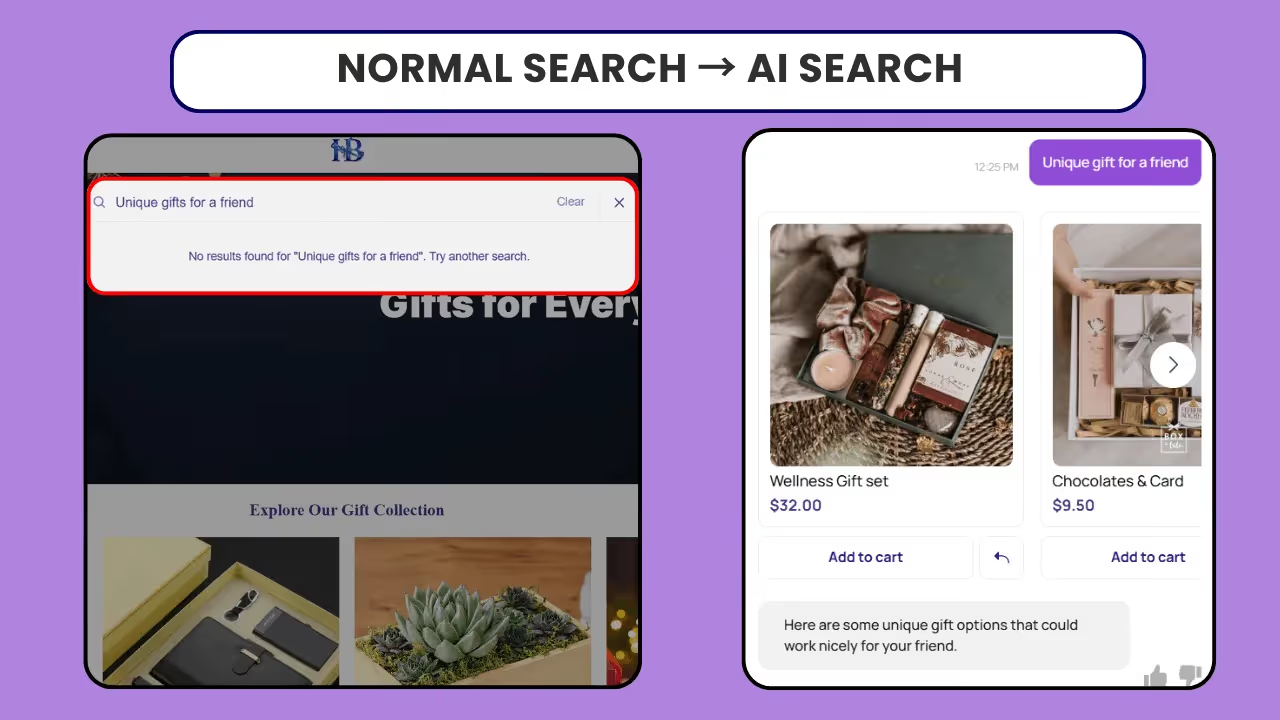
Because of this, there’s often a gap between how your customer searches and how results are shown.
Let’s see the difference between keyword-based search and AI Search
Shopify Keyword Search vs AI Search
So what does this mean for your store?
Your customers have to guess the “right” keywords, and if they don’t find what they need, they leave quickly, resulting in a lost conversion.
Actually, the worst part is that in many cases, the products are already in your store, but they simply haven’t surfaced at the right time.
So the problem isn’t just search, it’s the gap between how your customers think and how search works.
To fix this, many brands are improving their Shopify search experience with AI that understands customer intent and shows the right products instantly.
Which brings us to the next question: what should a high-performing search experience look like?
What Do High-Performing Shopify Searches Do Differently?
For your store, you’ll want your search feature to drive conversions, right?
When the search shows "no results", it isn't just a small issue; it's a lost sale, and a frustrated customer may walk away.
So, it’s crucial to ensure that your customers always find the relevant options they want, so you don't lose them when they are ready to make a purchase.
To help your customers decide to buy, you need an advanced search feature.
For that, a high-performing search should:
👁️Control What Customers See First
- Search should let you decide what product should show up first.
- You can highlight bestsellers or products you want to promote.
⚡Fast, Consistent Results
- As your store grows, search needs to be fast & accurate.
- Customers expect quick results, especially on mobile. If the search is slow, they leave.
🔍 Help Customers Discover, Not Just Search
- Search should help customers choose products.
- Even if there’s no match, it should suggest similar or related items.
🛡️ Build Trust Through Relevant Results
- Search results must be consistent, accurate, and reliable.
- Irrelevant products can undermine customer confidence in your store, so a trustworthy search experience is essential.
Why Improving Shopify Search Alone Isn’t Enough for Conversion?
Even with a high-performing search, there are still limitations.
Most businesses start with support bots, built to answer customer queries, but they don’t help customers buy.
When your goal is to get customers to convert and make a purchase, it’s important to understand the difference between support bots and AI chatbots.
Support Bot vs AI Search: The Critical Difference
Support bots are designed to handle basic queries such as order status, returns, and FAQs. They are focused on resolving issues.
However, solving queries alone isn’t enough to fix the gaps in search and product discovery.
This is where an AI Chatbot comes in. They go beyond addressing the queries. It actively supports the entire buying journey.
Let’s see how this works.
AI chatbots don’t just recommend products, they:
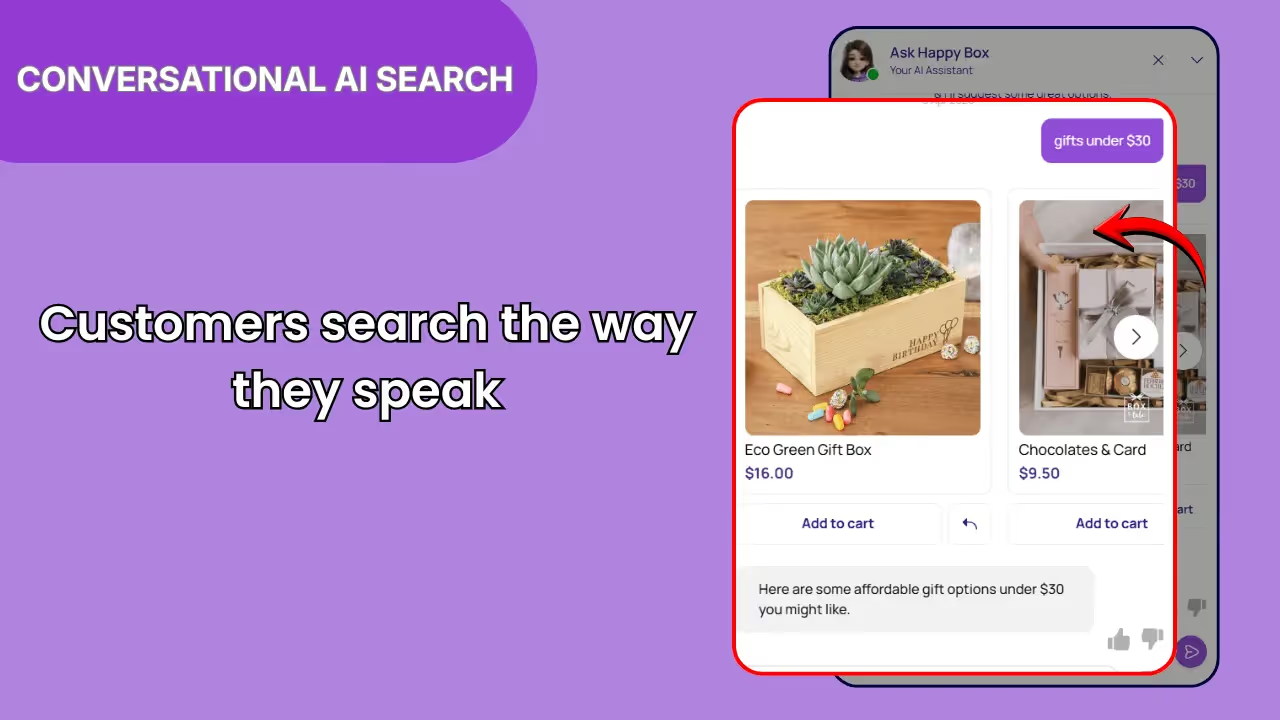
Understands What your Customers Search
- It interprets your customer’s queries and shows them relevant products even when the search returns no results.
- Understands the natural language your customers type, including phrases rather than just keywords.
- Recognises your customer’s intent behind vague searches and suggests the items.
- Ignores typos and spelling mistakes without breaking the search experience.
- Connects similar terms and synonyms to show better results.
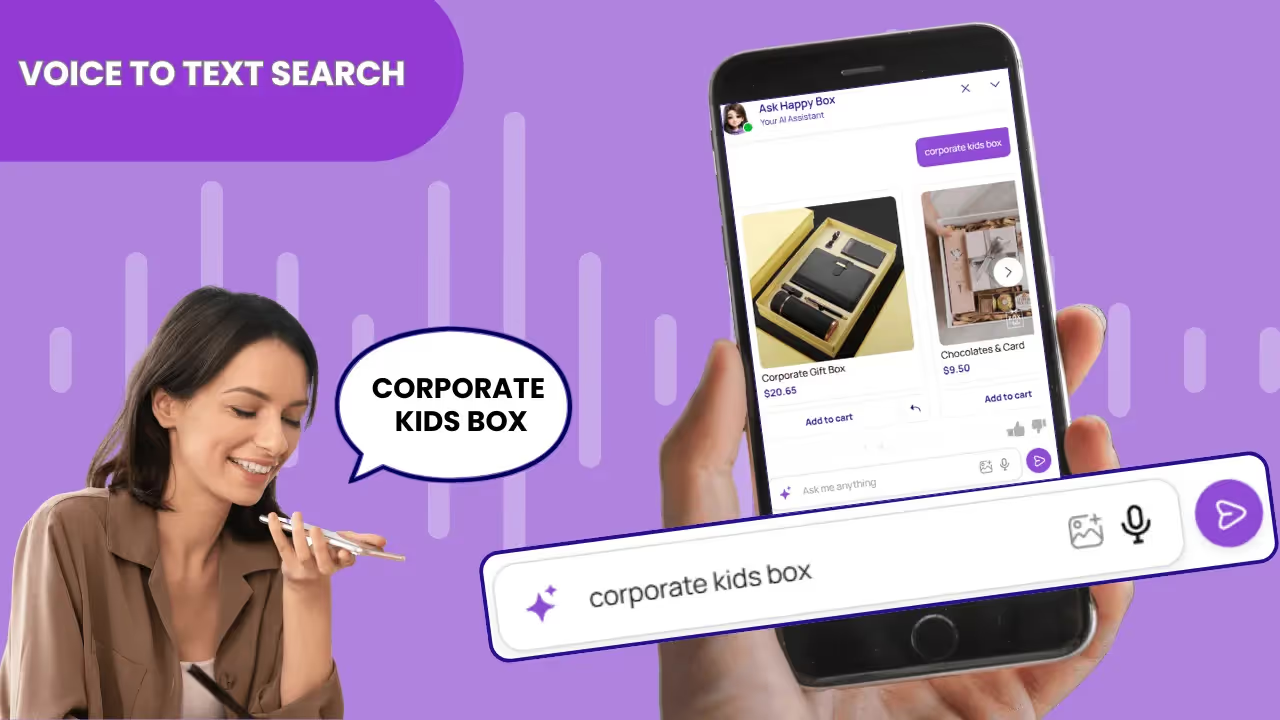
Supports Voice-to-Text Search
- Customers can speak their queries instead of typing, making the search faster and more natural, especially on mobile.
- Ignores mispronounced words and still delivers the right results.
- It makes searching easier for users who prefer to browse hands-free.
- Allows your customers to search easily, making it more convenient.
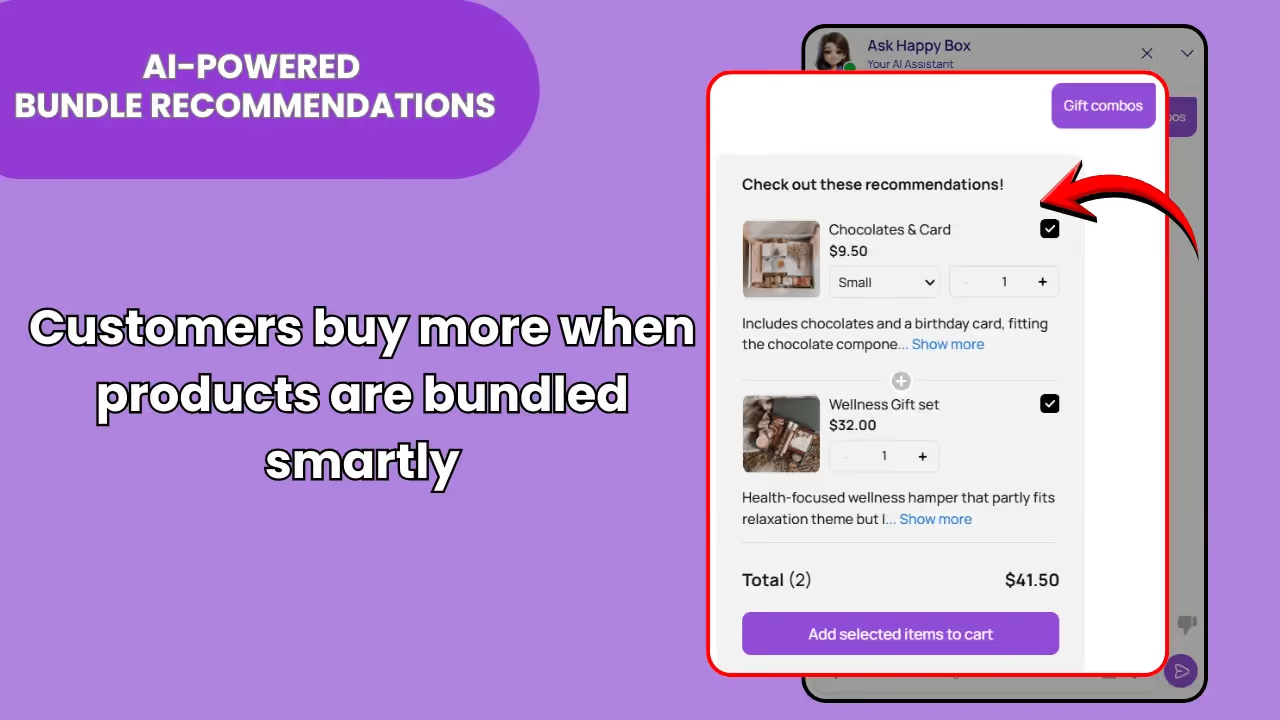
AI-Powered Bundle Recommendations
- The chatbot creates smart product bundles based on your customers’ needs.
- The AI chatbot groups the items, making it easier to purchase multiple products at once.
- The bundle simplifies the shopping experience by reducing the need to search for each item individually.
- Offers various bundle options, giving customers more choices.
Want to start boosting your sales with bundles? Explore how to display a Shopify product bundle using an AI chatbot
Smart Nudges
Prompts like “Looking for gifts under $18? “Need Assistance, I’m here” will allow customers to interact and get guided help to find the right product.
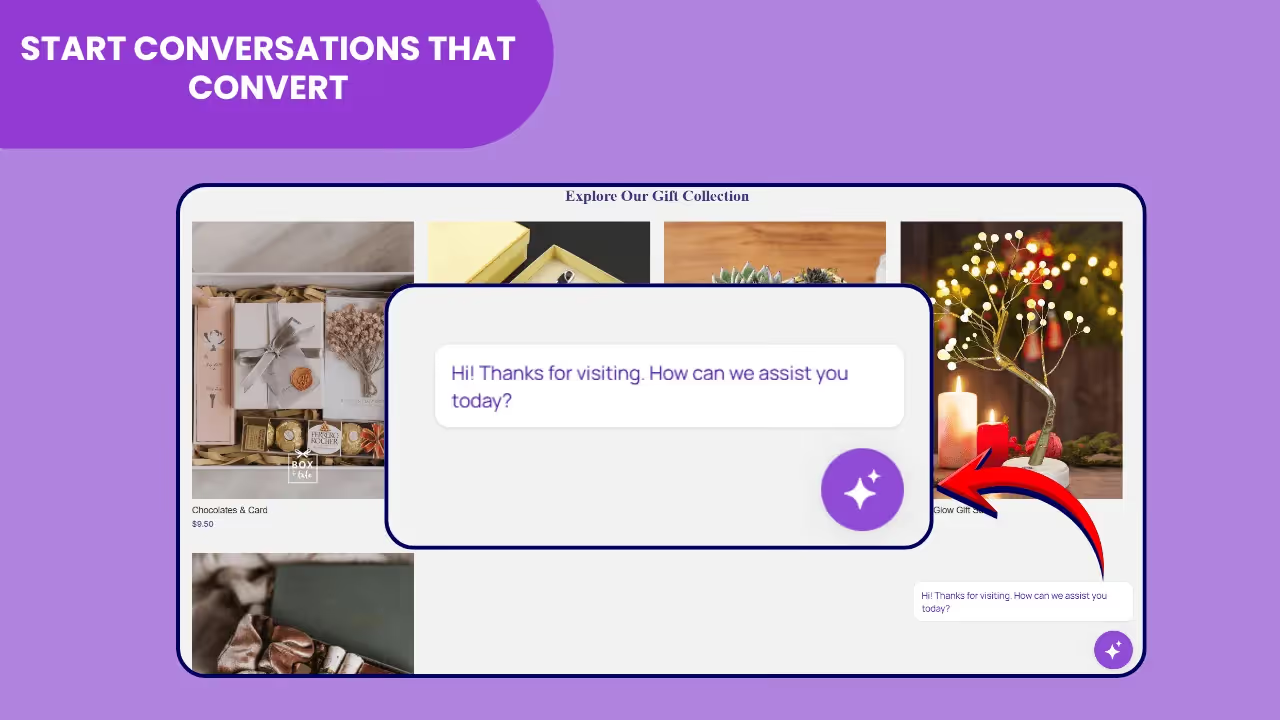
Works 24/7
Instantly answers queries and is available 24/7. When needed or if your customer requests, it redirects to human support.
Improves Over Time
Learns from your customer interactions and delivers better recommendations
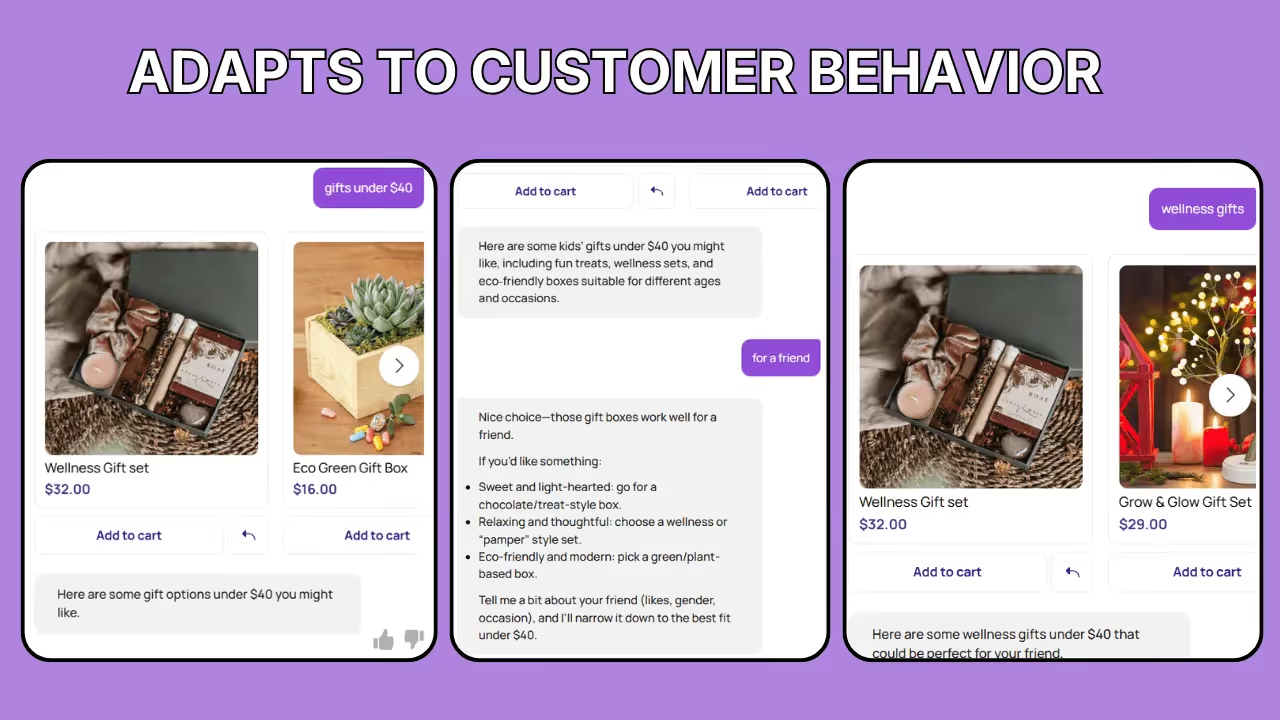
Drives Higher Conversions
The AI chatbot uses upselling, cross-selling, and bundles to increase order value.
The difference is simple: support bots assist, but an AI chatbot converts.
Ready to turn search into sales? Discover the “Top Sales AI chatbots for Shopify search” that deliver high conversion lifts.
If you’re wondering how to get started, it's very simple.
Here’s how you can set up AskTimmy on your Shopify store.
How to Set Up an AI Chatbot(AskTimmy) on Shopify
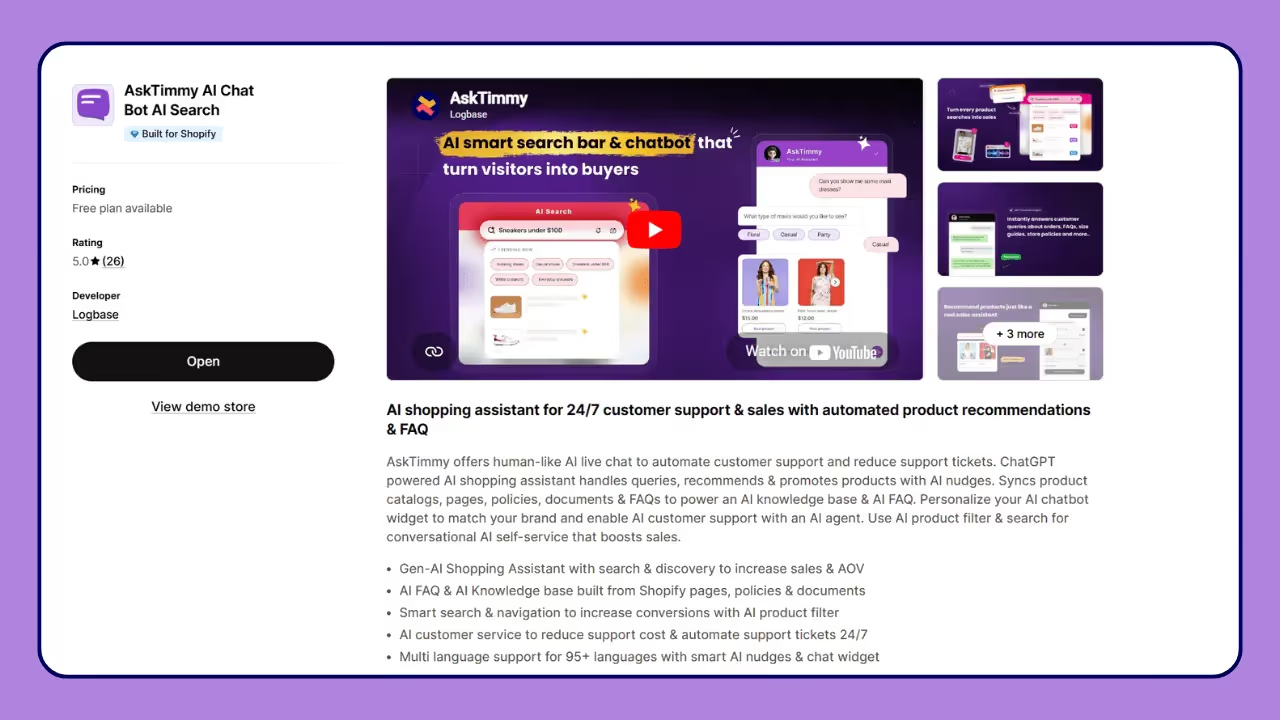
1. Install the App
Search for the AskTimmy app from your Shopify store and install it.
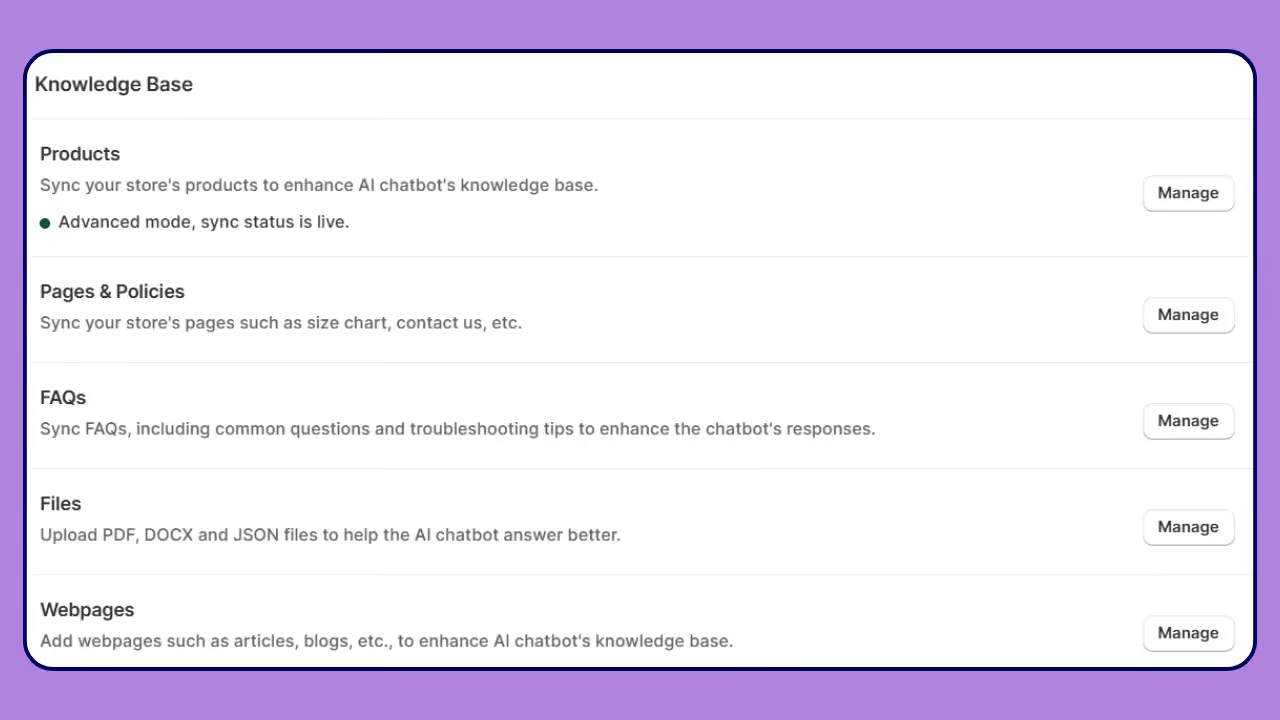
2. Train the AI (Very Important)
Once you install the app, the process is very simple and easy to follow.
AskTimmy can automatically start answering customer questions, even without training. But to make it more accurate and helpful, you should set up a few things.
Add your store policies so the chatbot can answer questions about shipping, returns, and exchanges.
Make sure your products are properly synced. This helps the chatbot show the right products and not miss anything.
Also, add FAQs. This helps answer common questions and builds trust with your customers.
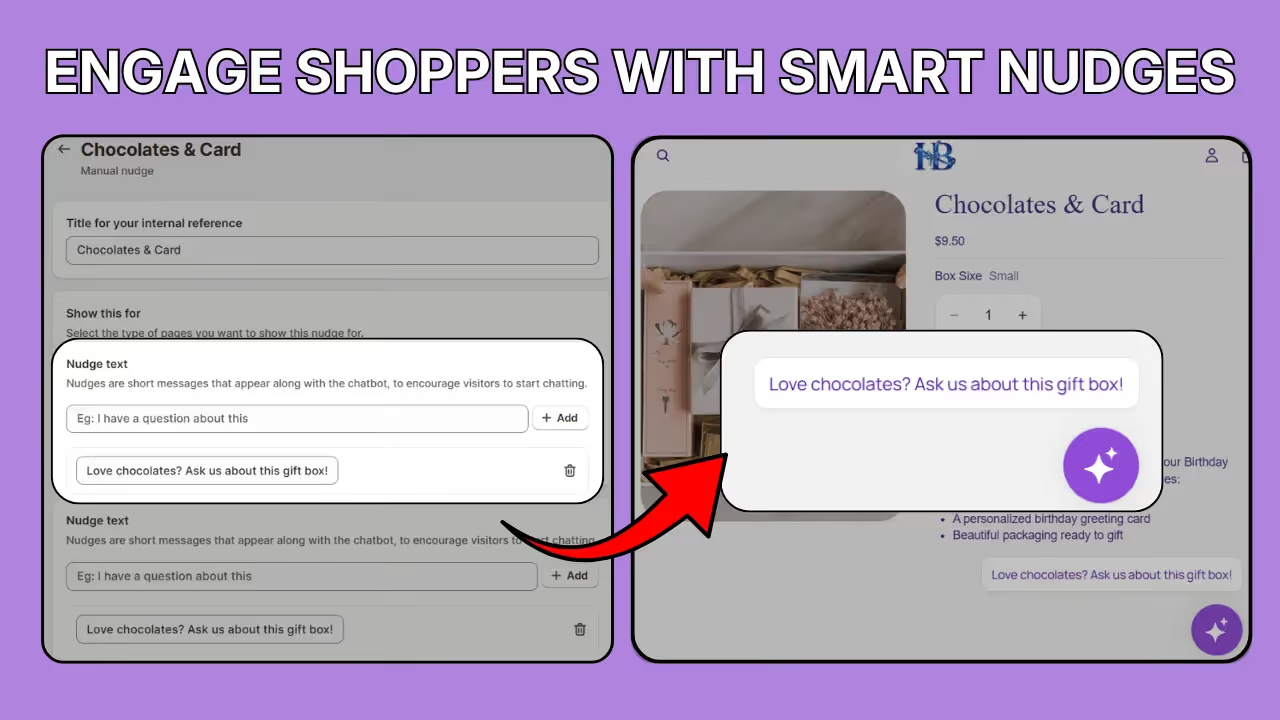
3. Set Up Nudges (To Start Conversations)
Nudges help your customers engage in conversation with your chatbot and receive instant results, rather than having to visit different pages to search for products.
You can give engaging prompts that encourage your customers to chat. You can place different nudges on the Homepage, Product pages, and Cart page to reduce drop-offs.
4. Customise your Chatbot
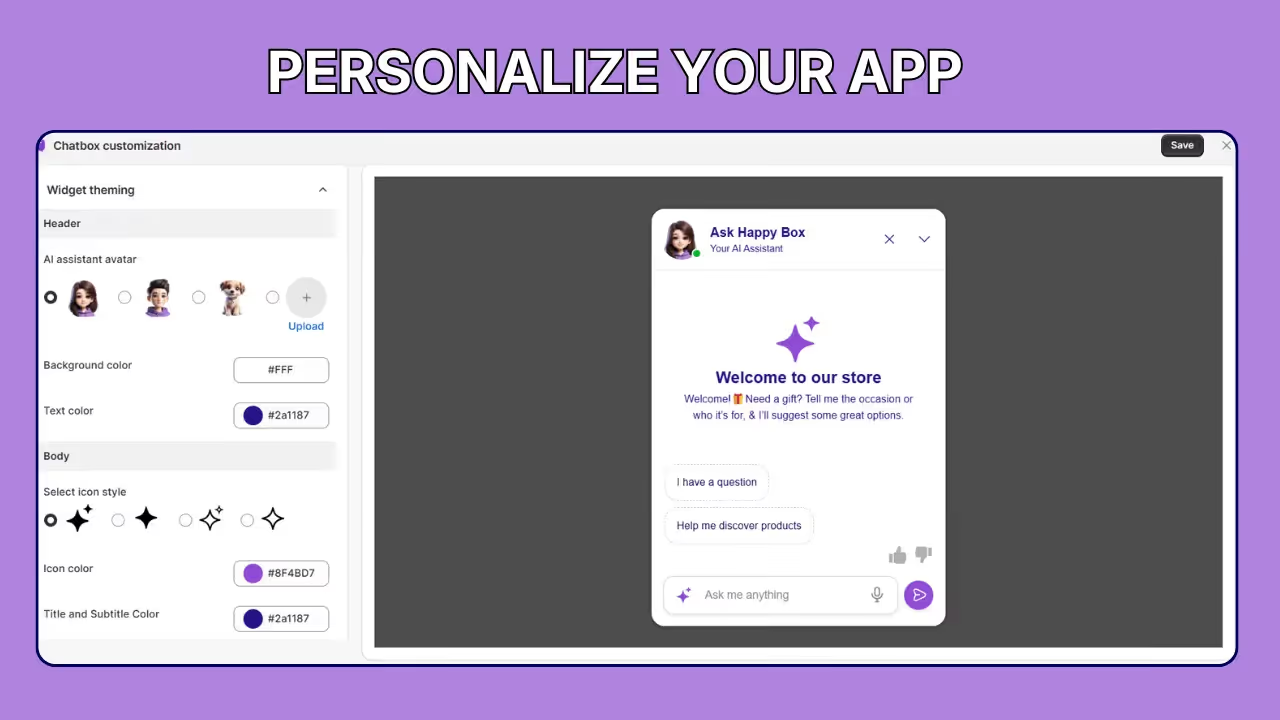
You can personalize your chatbot to match your brand's identity. This includes changing the avatar to something that represents your business or uploading your brand logo.
Additionally, you can customize the text color, icon style, and icon size to fit your preferences.
You also have an option to modify the text as it appears in the chatbox to ensure it aligns with your brand’s voice and style.
5. Test Everything:
After you’ve made all the changes, test how the chatbot works in your store. Try typing with incorrect spelling and using different terms like “running shoes” instead of just “shoes” in natural language.
6. Go Live & Improve:
After testing everything, go live with the chatbot. Review conversations regularly to understand customer questions, improve responses, and optimize nudges and suggestions weekly.
If you need help with the set-up, you can also book a demo. Our support team will be happy to guide you through.
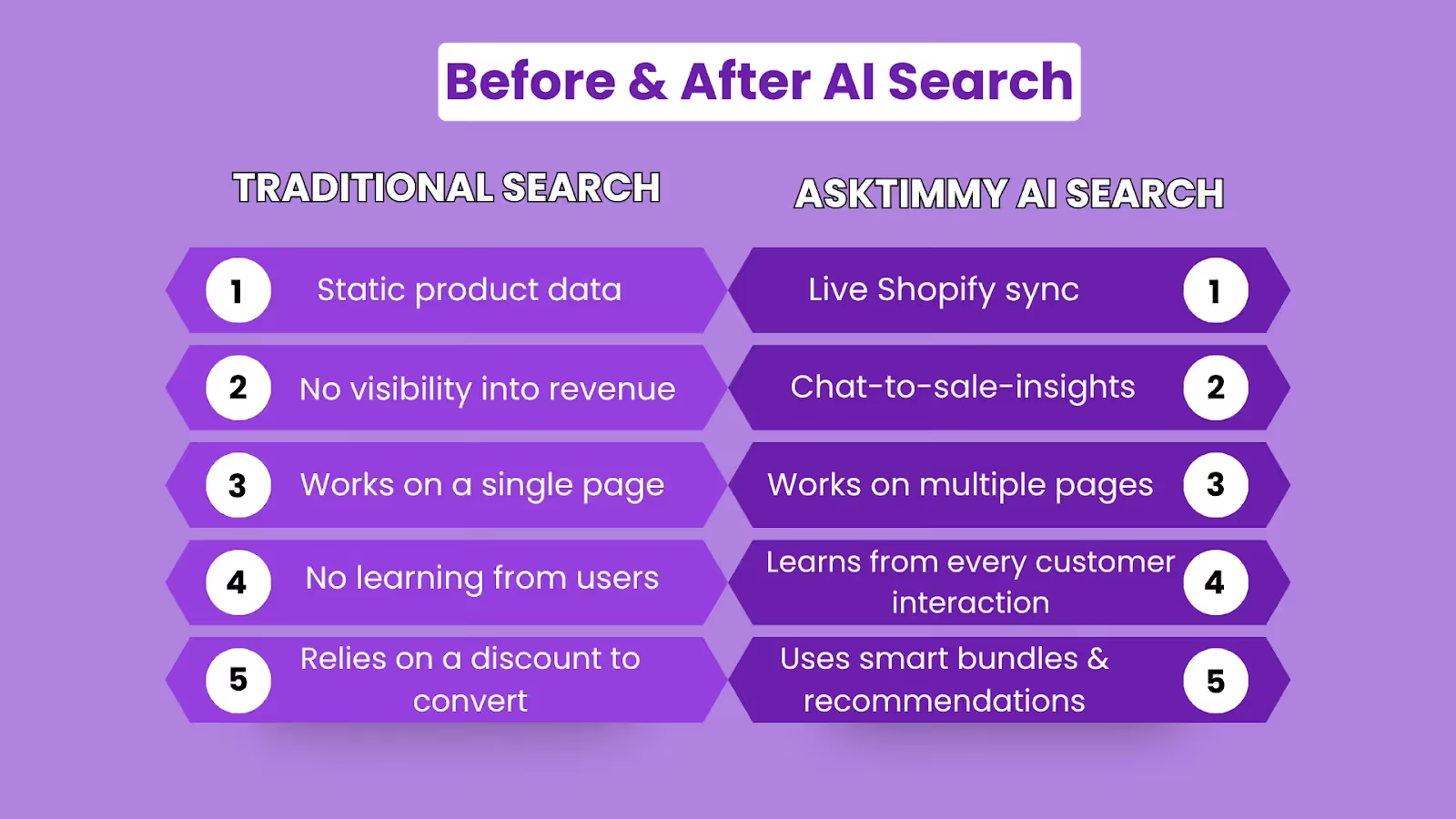
Before vs After Using AI Search (AskTimmy)
Once you’ve set up AskTimmy on your store, you’ll start to notice the difference.
It’s not only about how your chatbot performs, but it’s also about how your entire store improves.
Here’s what that shift looks like in practice:
The Bottom Line
By now, you have seen how much the right search experience can enhance your store.
As AI continues to evolve, the real opportunity lies in how you choose to leverage it for your business.
It’s about making it easier for your customers to find exactly what they’re looking for.
In short, search features display products, while chatbots assist customers with purchases.
Your customers will experience a smoother shopping experience, leading to better engagement and higher conversion rates for your store.
At the end of the day, it’s simple: the easier you make it for your customers, the better your results will be.
To increase conversions, it’s not just about search; it’s about creating a guided experience that actively drives sales.
Ready to improve your store? Install the AskTimmy app, and start turning customer searches into real sales.
FAQs
1. How can I improve my Shopify search results using AI search?
Shopify search matches keywords, which can limit accuracy. While AI search improves this by understanding the customer’s intent instead of just keywords.
Apps like AskTimmy support natural language, fix typos, and suggest relevant products, even without exact matches, making it easier for customers to find and buy.
2. Will AI search help increase sales or just answer questions?
AI search does both. It helps customers find products, suggest items, and increase conversions, not just addressing the question.
3. Is AskTimmy affordable for small stores?
Yes. There is a free plan.
4. Can an AI chatbot handle order-related queries in Shopify?
Yes, the chatbot can handle and respond to common customer questions like order status, product availability, and basic support queries.
5. Do customers actually use the Shopify AI chatbot?
Yes. Apps like AskTimmy use simple nudges and prompts to encourage customers to interact, increasing engagement across your store.