.png)
.avif)
.avif)
Here's a frustrating reality for most Shopify store owners.
A customer lands on your store, types ‘gift for anniversary’ into the search bar, and gets... zero results.
Or they search ‘comfortable shoes’ and nothing shows up because your products are listed as sneakers and athletic footwear.
They leave, and you lose the sale.
According to recent data, 30% of e-commerce site visitors use search, and those searchers are 2-3 times more likely to convert than non-searchers.
But here's the worst part: 68% of customers won't return to a site after a bad search experience.
That's a big gap because your search bar only understands exact keyword matches.
But what if your search could actually understand what customers mean, not just what they type?
That's where AI smart search comes in.
What Is Shopify AI Search?
Regular Shopify search is pretty basic. It looks for exact word matches in your product titles and descriptions.
For example, if a customer searches for ‘necklace’ but you've labeled your products as ‘pendant chain’ or ‘layered neck piece,’ they won't see those results.
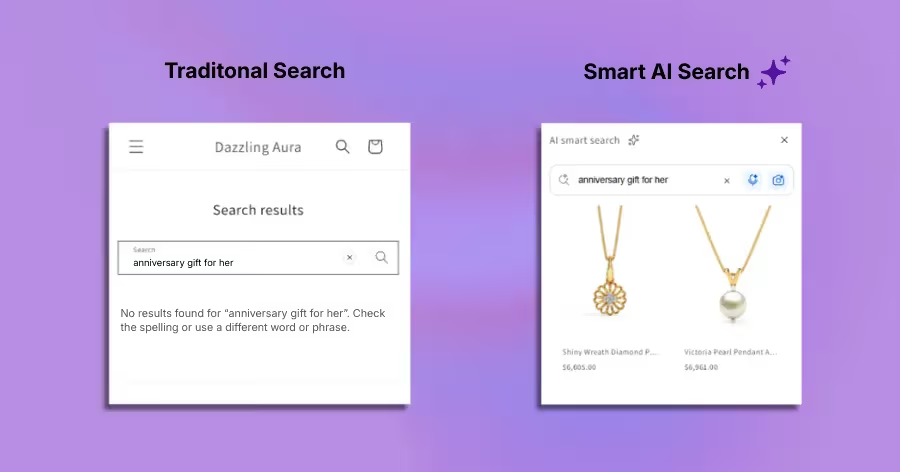
AI smart search changes this completely. It understands the intent behind what someone's searching for, not just the literal words they type.
AI smart search works on semantic search and not exact keyword search.
So when someone searches for ‘anniversary gift for her,’ the AI doesn't just look for those exact words. It understands they're looking for something romantic and suitable for a partner. It shows rings, necklaces, bracelets, or anything that suits the intent.
It’s like talking to a sales associate who actually understands what you're looking for.
Three Ways Shopify AI Search Actually Works
1. Semantic Text Search
Instead of matching exact keywords, AI search understands meaning and context.
Here’s an example flow from a jewelry store:
Step 1: Customer searches ‘something sparkly for mom.’
Step 2: AI smart search shows diamond earrings, crystal bracelets, gemstone rings
Step 3: All relevant, even though "sparkly" isn't in any product title
2. Voice to Text Search
Your customers are on their phones. Mobile now accounts for over 60% of ecommerce traffic. Speaking is faster than typing, especially when they're multitasking.
They can just say "show me gold earrings under $200" and get it typed quickly. They just hit search and get instant results. It saves a lot of time.
3. Image Search
This one is a cool feature. Your customer sees a necklace they love on Instagram. Instead of trying to describe it, they just upload the photo or take a quick photo with their camera.
The AI smart search finds similar products in your store instantly. It's a visual search that actually works. It’s similar to how Google Lens approaches visual shopping.
Why You Need Shopify AI Search (The Real Benefits)
1. Fewer ‘No Results Found.’
You know that feeling when you search for something on a site and get ‘No results found’?
Your customers hate it too. With AI smart search, there's almost always something relevant to show.
Even if they search for ‘cozy weekend outfit,’ the AI understands and shows loungewear, casual dresses, and soft sweaters.
2. Better Mobile Experience
Most of your traffic is from mobile. Voice-to-text search and image search make it easier for mobile shoppers. It saves a lot of time and reduces friction for customers.
3. Higher Conversion Rates
People who use search are ready to buy. When they actually find what they're looking for, they convert. It's that simple.
See exactly how to increase your Shopify conversion rate with AI to understand the full picture.
4. Less Friction in the Buying Journey
Every extra click, every failed search, every ‘try again’ moment makes customers leave your store. AI search removes that friction. They search once, they find it, they buy it.
This is also why cart abandonment is so closely tied to poor search experiences. When customers can't find what they want, they leave without buying.
5. You Learn What Customers Actually Want
The search analytics for AI smart search show you exactly what people are looking for and how they're describing products. This is gold for inventory planning and marketing.
How to Set Up AI Smart Search
Okay, to add this AI Smart Search, I’m using the AskTimmy app. Here are few features that stand out:
1. Search Starters That Actually Help
You know those little suggestion chips that pop up near the search bar? Those are called search starters, and they're super useful.
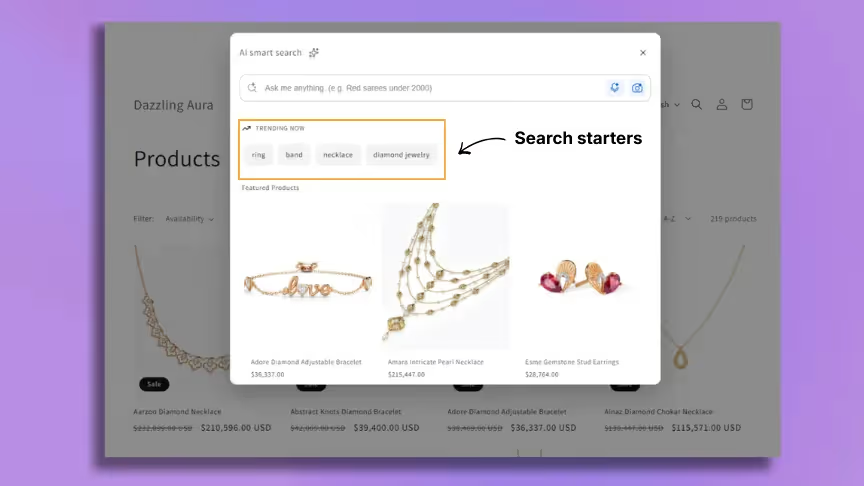
Instead of customers staring at a blank search box, wondering what to type, they see instant options like ‘engagement rings,’ ‘gift ideas,’ or ‘trending under $999.’
It's like giving them a gentle nudge in the right direction.
You can also customize these based on what people actually search for.
If your analytics show everyone's looking for ‘summer dresses,’ make that a starter. You get up to 5 suggestions, and honestly, that's plenty without overwhelming people.
2. Featured Products Right in the Search Widget
This one's a great feature. You can highlight up to 15 products directly inside the search widget before someone even types anything.
So the moment a customer clicks your search icon, they see your best sellers, new arrivals, or whatever you want to push. It's prime real estate for products you want to move.
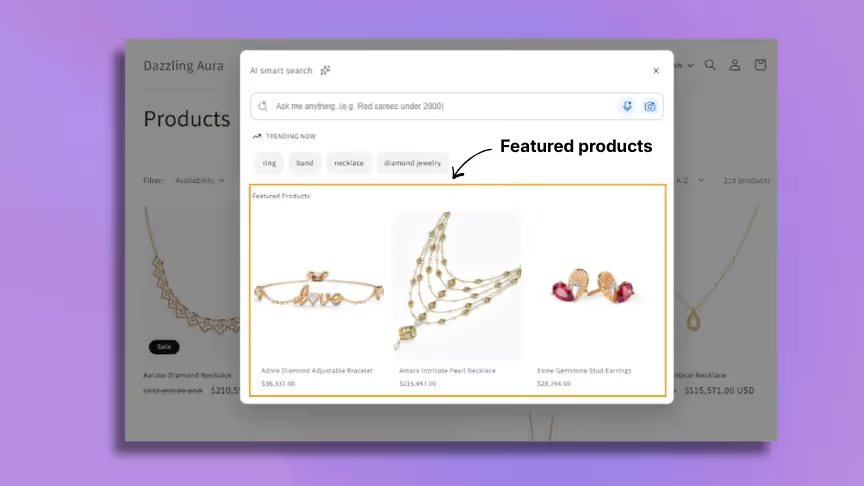
You can use it to:
- Feature bestsellers that always convert which is a great way to boost revenue in your Shopify store
- Push new inventory that needs visibility
- Clear out slow movers by giving them the search widget spotlight
- Rotate seasonal highlights (Valentine's gifts, summer essentials, etc.)
The cool part is that customers see these featured products whether they search or not.
3. Search Analytics That Actually Matter
Most Shopify search apps give you data, but not useful data. AskTimmy's analytics dashboard shows you:
This isn't just metrics. If you see people constantly searching for ‘waterproof hiking boots’ but you don't carry any, that's a clear signal.
Or if searches for ‘blue dresses’ convert way better than ‘red dresses,’ you know what to stock more of.
4. The Whole Package Works Together
What akes this feature work is how everything connects. The semantic search finds relevant products, and the voice and image search make it easy on mobile.
Also, the search starters guide discovery, the featured products grab attention, and the analytics tell you what's working.
You get all this with the AskTimmy app. Try the app in the free plan and decide for yourself.
Tips and Tricks for Shopify AI Search
1. Update Your Search Starters Regularly
Don't set these once and forget them. Change them based on:
- Seasons (winter coats, summer dresses)
- Holidays (Mother's Day gifts, back to school)
- What's actually trending in your analytics
2. Use Featured Products Strategically
Rotate these weekly or biweekly. Feature different products to keep the search widget fresh and give more of your inventory visibility.
Combine this with these 6 ways to sell more on Shopify using an AI shopping assistant for maximum impact.
3. Check Your Search Analytics
AskTimmy shows you what people are actually searching for. Look at:
- Top search terms (what are people typing?)
- Conversion metrics (which searches lead to sales?)
- Top products by clicks (what's getting attention?)
Use this data to optimize your product titles, descriptions, and even your inventory. If people keep searching for ‘waterproof boots’ but you don't have any, that's a clear signal.
4. Optimize Product Descriptions for AI
AI search works better when your product descriptions are detailed and natural. Instead of just ‘Blue Dress,’ write "Elegant blue maxi dress perfect for summer weddings and beach vacations."
This also connects well with building an AI knowledge base for your Shopify store. Better product data means better search results.
5. Use Simple, Clear Starter Text
Your search starters should be terms people actually use, not marketing jargon. "Gifts for her" works better than "curated feminine accessories."
The Bottom Line
Most Shopify stores have a search problem. Customers can't find what they want because traditional search only understands exact keywords. They leave frustrated, and you lose sales.
AI smart search fixes this. It understands intent, works with voice and images, and shows relevant results even when customers use vague or creative search terms.
The setup takes about 10 minutes. What is the impact on your conversion rate? That can be significant.
To add this feature, you can try apps like AskTimmy and help customers discover your products better.
Still wondering if this makes sense?
Read our breakdown on whether Shopify AI chatbots are actually worth it ( the answer might surprise you.)
The setup takes about 10 minutes. Ready to get started?
Here's exactly how to add an AI chatbot to your Shopify store in 4 steps.